Showing posts with label Sea Breeze. Show all posts

Tuesday, February 11, 2020

Cupcake Inspirations #486

Cupcake Inspirations is hosting a color challenge using a combination of green, brown and white. I created this background by inking my stamp in a pool of water and Color Bursts and then stamping on watercolor paper. 

Club Scrap background stamps and papers. Lawn Fawn circle die. Taylored Expressions sentiment stamp and die. Thrift store turtle button. 


Wednesday, July 25, 2018

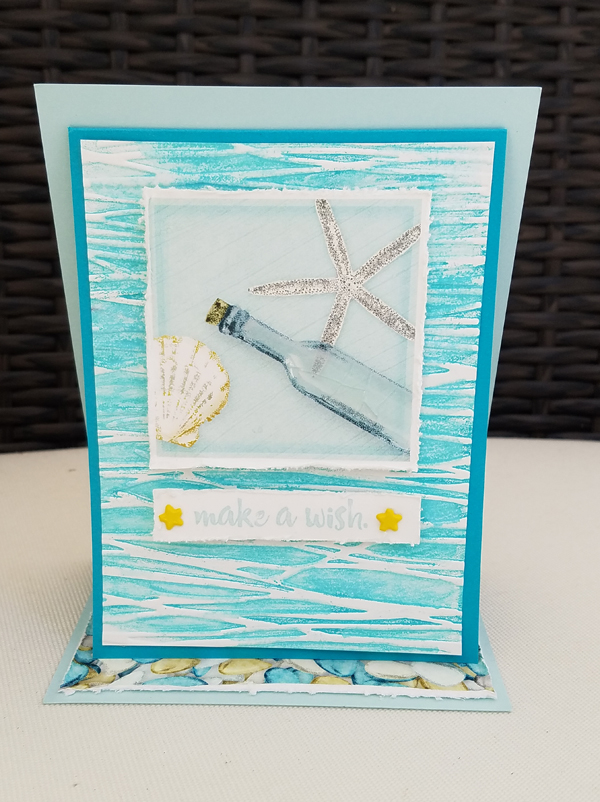
Make a Wish

Welcome to the Club Scrap Sea Breeze Linky Party! Today Club Scrap would love for you to share your Sea Breeze layouts, cards and projects on their website for a chance to win a Club Scrap gift certificate. 
I was honored to be the Guest Artist for the Sea Breeze Card collection and assembled my paper layouts so I really had no left over paper supplies.  The great thing about the Sea Breeze digital kit is you can print out the papers and elements over and over to create something tangible.  However, I decided to create a digital layout with the elements. 

Club Scrap overlay, frames, sentiment and shells. Studio DD strip. Joanne Brisebois overlay.


Friday, July 20, 2018

Beach Scenes

Need ideas for creating beach scenes?  Club Scrap is hosting a Beachy Background challenge. Link up your ideas and projects for a chance to win a Club Scrap gift certificate. 

With this background I inked the flat surface of an embossing folder with distress oxide inks before embossing the white panel.  I then used a water brush to blend the ink.  The "sand" is stamped but the ink slowly disappeared as it dried. 

The bottle is stamped onto clear acetate with Staz-On ink. Add a green tint to the bottle with a Copic marker.  Wrap the neck of the bottle with brown twine. Stamp the message, tear and adhere so the bottle will be resting on top. Adhere the bottle with bookbinding glue. 

Stamp the starfish on turquoise paper, fussy cut and add Nuvo Crystal drops to add depth and glitter. 

Club Scrap papers, stamps and charm. Cuttlebug embossing folder. Copics marker. 


Have a fabulous weekend! 

Wednesday, July 18, 2018

Helpful Tips

I was honored to be Club Scrap's Guest Artist this month showcasing the beautiful Sea Breeze card collection. You can see these fun beach themed cards in their entirety here. I wanted to share a few helpful tips and tricks I've learned in my crafting adventures. 

1. When adhering embossed panels use Scor-tape. This double sided tape is super strong.  You can push the tape into the embossed areas for better adhering. 
2. Edge your fussy cut images with a marker.  This give the image sharper edges. 
3. Who doesn't have sticker sheets where all the vowels are gone? I use the left over stickers for adhering wrapped ribbon ends to the back of panels. 
4. I buy adhesive foam sheets in bulk and cut them to fit the panel I intend to elevate. Try to use similar colors as your project card, at certain angles the color will show. 
5. Add depth and shine to small stamped images or die cuts with Nuvo Crystal drops using a needle-tip applicator. 
Paper Smooches "Hope" die. Club Scrap stamp. Impression Obsession sunburst stamp.

6. Ink the inside flat surface of an embossing folder prior to embossing your paper. Use a water brush to distribute ink for a softer watercolor look. 

Club Scrap papers, tags. Making Memories star brads. Tonic Nuvo drops. Cuttlebug embossing folder.

Hopefully you found some of these tips and tricks helpful. 
Have a fabulous day!


Monday, July 16, 2018

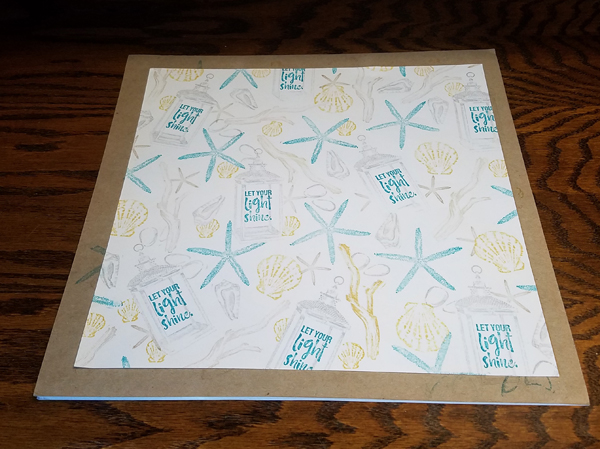
Let Your Light Shine


I couldn't wait to create a Master Board with the Sea Breeze stamps. A few years back a group of ladies from the Club Scrap online community did a Master Board swap which was so fun to receive. A Master Board is basically a collage of different stamped images. I tend to use masks and stamp but you most certainly can have your images overlap.  

Stamp on a 12x12 sheet of cardstock with different images and colors. Trim into panels.
I created two cards from the Card Making Idea Deck using the newly created backgrounds. 
Need more ideas? Here's a few links including one with a video tutorial.